Turbo Dismount
Good for players who like vehicle physics, crashes, ramps, and experimenting with momentum.
View on SteamDrive Mad looks simple, but most crashes come from speed and angle control. This guide explains why the car flips and how to make small corrections without overdriving.
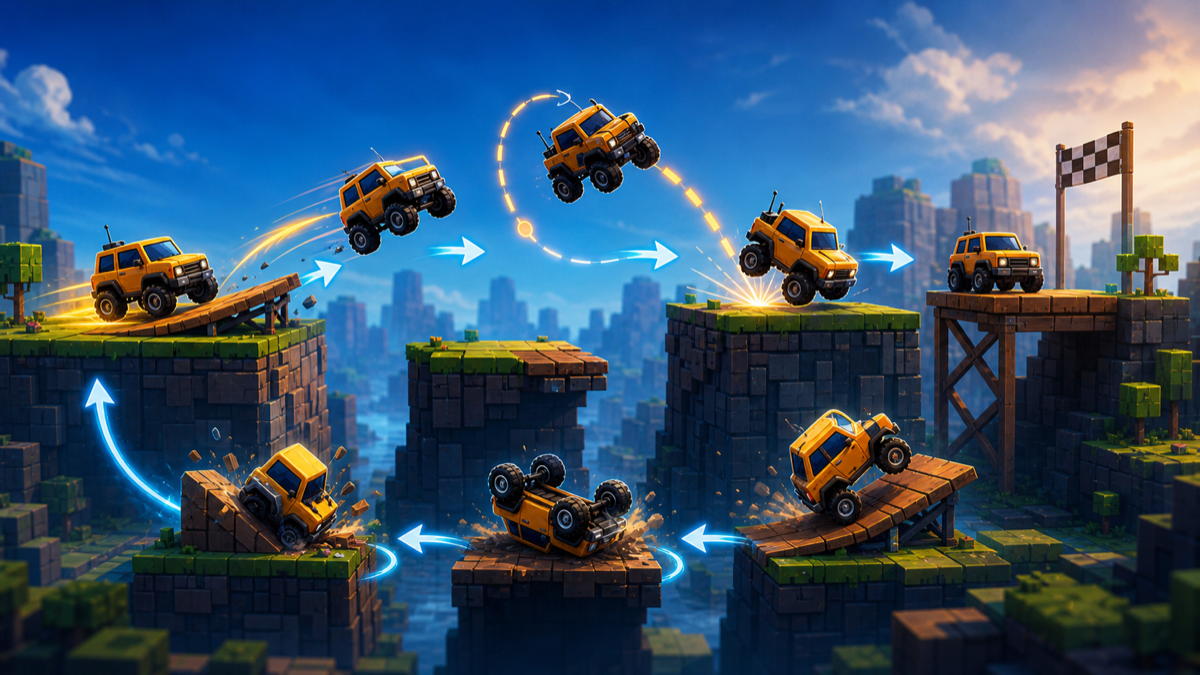
Your car flips in Drive Mad when speed, ramp angle, landing angle, or mid-air correction gets out of balance. The fix is usually not more acceleration. Tap the throttle, approach ramps with less speed, keep the vehicle level before landing, and stop overcorrecting in the air. Treat each obstacle as a small physics puzzle rather than a race.
Drive Mad is a browser physics driving game where the challenge is keeping a vehicle balanced across ramps, gaps, bridges, and awkward platforms.
Drive Mad clips work well in short videos because flips and near-saves are easy to understand. Players search for control tips when they realize holding acceleration makes things worse.
Start a level, read the obstacle, control speed, cross the gap or ramp, manage the vehicle angle, land as cleanly as possible, and retry quickly when the approach fails.
Start with the official platform, store page, or trusted game portal when available. Avoid APK mirrors, mod downloads, cheat tools, private servers, generator pages, copied game pages, and unsafe download mirrors.
If you like this mechanic, look for games with a similar loop rather than random downloads or copied versions.
Good for players who like vehicle physics, crashes, ramps, and experimenting with momentum.
View on Steam
A fit if you enjoy vehicles, building, terrain challenges, and learning how balance affects motion.
View on Steam
Similar for players who enjoy physics puzzles, ramps, load balance, and careful structure planning.
View on Steam
Best if you want deeper vehicle physics, landing forces, suspension behavior, and crash experimentation.
View on SteamUsually because speed and landing angle are out of balance.
Usually no. Short taps give better control.
Aim to land flatter, then accelerate after the wheels settle.
Approach with controlled speed and avoid launching too nose-high.
Straighten the car before adding speed.
It is an independent guide and does not host the game.
This page is an independent fan-made informational guide. It is not a publisher page and does not host or distribute the game. It does not provide unsafe clients, exploits, account rewards, or unsafe game files.